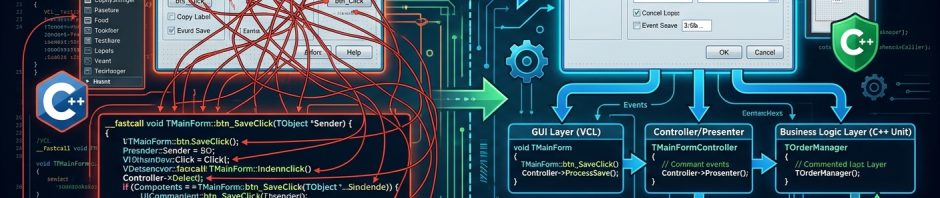
Refactoring C++ Builder Event Handlers for Cleaner, Testable GUI Code
A button handler can become the busiest room in a C++ Builder application. It reads controls, checks quantities, calculates prices, writes records, and changes labels. Then a small pricing change breaks something on the form. Testing that change means launching the application and clicking through the same screens again. Moving business logic into ordinary C++ classes gives those rules a home where you can understand and test them without opening a window.
Keep the Click Small. Let a button handler translate control values into ordinary inputs, call a class that owns the business rules, and display the result. Keep calculations and business validation independent of forms, labels, and message dialogs. Start with one calculation, preserve its current behavior, and test its boundaries. This creates a useful separation without forcing you to redesign the entire application or introduce a large framework before making progress.
Find the Rules Hiding Between Control Updates
Read an existing handler and ask what each statement needs to know. Reading QuantityEdit->Text requires knowledge of the interface. Checking whether an order quantity is positive belongs to the order rules. Assigning text to TotalLabel->Caption belongs to the interface again.
These statements may sit beside each other, but they have different reasons to change. A redesigned form should not force a pricing change. A new pricing rule should not require changes to several click events.
Consider an order screen with a quantity field and a calculate button. The handler currently converts the quantity, rejects invalid values, multiplies it by a unit price, and displays the total. That calculation is a good first extraction. It has a clear input and a clear result.
Before moving anything, record the existing behavior. Check what happens with an empty field, zero, a negative number, and a very large value. Decide whether odd behavior is an existing requirement or a defect that needs a separate change. Refactoring becomes easier to review when behavior changes are deliberate.
Give the Calculation an Ordinary C++ Interface
The extracted class should accept values that make sense outside a form. Pass a quantity and a unit price, rather than passing edit controls or a form pointer. Return a result that another caller could use without knowing which label will display it.
The following example uses integer cents and a nonnegative unit price. It checks multiplication before performing it. The syntax avoids newer language features, which makes the example easier to adapt to projects using older C++ Builder toolchains.
// OrderCalculator.h
#ifndef OrderCalculatorH
#define OrderCalculatorH

struct OrderTotal
{
    int cents;
};

class OrderCalculator
{
public:
    OrderTotal Calculate(int quantity, int unitPriceCents) const;
};

#endif
// OrderCalculator.cpp
#include "OrderCalculator.h"
#include <climits>
#include <stdexcept>

OrderTotal OrderCalculator::Calculate(
    int quantity, int unitPriceCents) const
{
    if (quantity <= 0)
        throw std::invalid_argument("Quantity must be positive.");

    if (unitPriceCents < 0)
        throw std::invalid_argument("Unit price cannot be negative.");

    if (unitPriceCents > INT_MAX / quantity)
        throw std::overflow_error("Order total is too large.");

    OrderTotal result;
    result.cents = quantity * unitPriceCents;
    return result;
}
This class has no dependency on VCL headers. It does not display messages, change focus, or choose a currency symbol. Its responsibility is narrow enough to describe in one sentence: calculate a valid order total within the supported integer range.
Integer cents suit this limited example. A production pricing system may need currency identifiers, tax rounding, fractional unit prices, or larger numeric ranges. Those requirements belong in an explicit money policy. Simply replacing every monetary value with a floating point number does not define that policy.
Keep the Button Handler Focused on the Form
After extraction, the click handler still has useful work to do. It reads the quantity, checks whether the text represents an integer, calls the calculator, and presents either a result or a message.
Assume the example form contains QuantityEdit and TotalLabel. Its implementation includes the calculator header, the relevant VCL headers, and <stdexcept>. The unit price is fixed here to keep the boundary visible.
void __fastcall TOrderForm::CalculateButtonClick(TObject *Sender)
{
    int quantity = 0;

    if (!TryStrToInt(QuantityEdit->Text, quantity))
    {
        ShowMessage(L"Enter a whole-number quantity.");
        QuantityEdit->SetFocus();
        return;
    }

    try
    {
        OrderCalculator calculator;
        const OrderTotal total = calculator.Calculate(quantity, 1250);

        TotalLabel->Caption =
            IntToStr(total.cents) + L" cents";
    }
    catch (const std::invalid_argument&)
    {
        ShowMessage(L"Enter a quantity greater than zero.");
        QuantityEdit->SetFocus();
    }
    catch (const std::overflow_error&)
    {
        ShowMessage(L"The total exceeds the supported range.");
    }
}
The handler translates domain failures into messages suitable for this screen. It does not show raw exception text to the user. That leaves room for localization and friendlier wording without changing the calculator.
Text conversion and business validation serve different purposes. The form checks whether it can obtain an integer. The calculator checks whether that integer is allowed. Keeping the positive quantity rule inside the calculator protects future callers, including an import routine or another form.
This example leaves the previous total visible after an error. Your application may need to clear it or mark it as outdated. Make that presentation choice explicit, especially when a stale total could confuse someone entering an order.
Use Drafting Help Without Giving Up Technical Judgment
Once one extraction works, a cpp coding assistant can help draft alternative class interfaces or suggest test cases you missed. A focused prompt works best: provide the calculation, describe the supported compiler, and ask for a version with no VCL dependencies.
Treat the suggestions as review material. Check language features against the actual compiler and project settings. A proposed solution may assume smart pointers, library facilities, or exception behavior that your application does not support.
Check object ownership with the same care. A suggestion that manually deletes an owner-managed component can create a lifetime bug. A suggestion that stores a form pointer in a service can make the service depend on a window that may already have closed. Compile the proposed code, inspect its lifetimes, and run meaningful tests before adopting it.
Test the Rules Without Starting the Application
The extracted calculator can now run inside a console test executable. That executable needs the calculator source and a C++ runtime. It does not need the order form, its resource file, or a sequence of mouse clicks.
Start with a normal order, then check rejected inputs and the arithmetic boundary. These tests describe behavior that matters to callers. They should remain useful if you later rewrite the multiplication code.
#include "OrderCalculator.h"
#include <cassert>
#include <climits>
#include <stdexcept>

int main()
{
    OrderCalculator calculator;

    assert(calculator.Calculate(3, 1250).cents == 3750);
    assert(calculator.Calculate(1, 0).cents == 0);
    assert(calculator.Calculate(1, INT_MAX).cents == INT_MAX);

    bool rejectedQuantity = false;
    try
    {
        calculator.Calculate(0, 1250);
    }
    catch (const std::invalid_argument&)
    {
        rejectedQuantity = true;
    }
    assert(rejectedQuantity);

    bool rejectedPrice = false;
    try
    {
        calculator.Calculate(1, -1);
    }
    catch (const std::invalid_argument&)
    {
        rejectedPrice = true;
    }
    assert(rejectedPrice);

    bool rejectedOverflow = false;
    try
    {
        calculator.Calculate(2, INT_MAX);
    }
    catch (const std::overflow_error&)
    {
        rejectedOverflow = true;
    }
    assert(rejectedOverflow);

    return 0;
}
Compile this small example with assertions enabled. Defining NDEBUG disables these checks. In an established project, use its test framework so failures remain visible under the configurations used by your build process.
Keep a few interface checks too. Verify that invalid text produces the intended message, focus returns to the correct control, and valid input updates the total. The calculator tests cover the rules. The interface checks cover the wiring and presentation.
Make Object Lifetimes Clear Before Adding State
The calculator above lives on the stack because it has no persistent state. Its lifetime is obvious, and it needs no manual cleanup. Avoid introducing heap allocation merely because the code now uses a separate class.
A larger service might need a repository or an application settings object. Decide who owns each dependency before passing pointers around. A borrowed pointer or reference requires its target to outlive the service. An owned dependency requires a clear destruction path.
VCL component ownership deserves separate attention. Components constructed with an owner participate in that owner’s cleanup. Ordinary C++ objects do not acquire that behavior just because a form stores their pointers. Keep these lifetime models explicit when adding service members to a form.
If calculation work later moves to a worker thread, preserve the same separation. Let the worker operate on ordinary data. Arrange control updates on the main VCL thread, and ensure any queued callback cannot access a form after it has been destroyed.
Extract Persistence Only When Its Boundary Is Clear
Database work often follows calculations inside a crowded handler. Move it carefully. A service that validates an order, saves its header, and saves its lines may need a transaction around those writes. Separating code into methods must preserve that transaction boundary.
Keep SQL and database component details behind a focused persistence interface when doing so helps testing. The service can request that an order be saved. The form can decide whether to show a success message, refresh a grid, or remain open for another entry.
A small test replacement for persistence can record the requested save or simulate a failure. Use that approach to test decisions, including whether invalid orders are rejected before saving. Avoid building a large abstraction layer for a handler that only performs a simple calculation.
Let the Next Change Prove the Separation
A useful refactoring makes the next change easier to place. A new quantity limit belongs with the order rules. A different label format belongs with presentation. A database failure belongs to the save operation, with a suitable message chosen by the interface.
Start with one button and one coherent rule. Run the extracted tests, check the screen, and review the resulting handler. It should read as a short account of a user action: collect input, request work, and present the outcome. That is a manageable pattern to repeat across a C++ Builder application, one event handler at a time.